Neuste Addons
Nach dem aktuellen Album folgende Alben in die Warteschlange stellen
Überblick
Dieses Add-on erweitert MediaMonkey 5 um eine Kontextmenüoption, mit der ganze Alben direkt nach dem aktuell abgespielten Album in die Wiedergabeliste „Aktuelle Wiedergabe“ eingefügt werden können – anstatt sie ganz am Ende der Wiedergabeliste anzuhängen.
Hauptmerkmale und Funktionsweise
Intelligenter Einfügepunkt:
Ausgewählte Alben werden direkt im Anschluss an den letzten Titel des aktuell abgespielten Albums eingefügt, sodass Ihre aktuelle Hörreihenfolge erhalten bleibt und neue Titel nicht ans Ende einer langen Warteschlange verschoben werden.
Vollständige Album-Warteschlange:
Wählen Sie einfach einen einzelnen Titel (oder mehrere Titel aus verschiedenen Alben) aus, klicken Sie mit der rechten Maustaste und wählen Sie „Album(s) nach aktuellem Album in die Warteschlange stellen“ . Die Erweiterung ruft automatisch alle Titel jedes ausgewählten Albums ab und fügt sie in der richtigen Titel- und Disc-Reihenfolge ein.
Duplikatschutz:
Alben, die sich bereits in Ihrer aktuellen Wiedergabeliste befinden, werden automatisch übersprungen, um doppelte Wiedergabe zu vermeiden.
Warnung vor langer Warteschlange:
Um versehentliche Hinzufügungen zu verhindern, erscheint eine Bestätigungsabfrage, wenn Ihre Auswahl 200 Titel übersteigt.
Feedback-Benachrichtigungen:
Eine kurze Pop-up-Benachrichtigung (Toast) bestätigt die Anzahl der hinzugefügten Alben und listet alle übersprungenen Duplikate auf.
Queue Album(s) after Current Album
Overview
This add-on enhances MediaMonkey 5 by adding a context menu option to queue entire albums directly after the currently playing album in your "Now Playing" list—rather than appending them at the very end of your queue.
Key Features & How It Works
Hide original
Smart Insertion Point:
Selected albums are inserted immediately after the final track of the currently playing album, keeping your immediate listening order intact without pushing new additions to the bottom of a long queue.
Full Album Queuing:
Simply select a single track (or multiple tracks from different albums), right-click, and select "Queue Album(s) after Current Album". The extension automatically fetches and inserts all tracks for each selected album in proper track and disc order.
Duplicate Protection:
Albums that are already present in your current "Now Playing" list are automatically skipped to prevent duplicate playback.
Large Queue Warning:
To prevent accidental additions, a confirmation prompt appears if your selection exceeds 200 tracks.
Feedback Notifications:
A brief pop-up notification (toast) confirms how many albums were added and lists any skipped duplicates.
By
AI (Inspired by Fetznschaedl)
Erstellt von fetzenschaedl
Aktualisiert 18/08/2026
Versionsverlauf/Details
- Version:
- 1.0
- Aktualisiert:
- 18/08/2026
- Size:
- 5.27 KB
- Funktioniert mit:
- Media Monkey 2024 - 2024
Top-Listen-Monitor
Top List Monitor wandelt Ihre MediaMonkey 5-Hörhistorie in dynamische, interaktive Ranglisten ( Top-Alben , Top-Songs und Top-Künstler ) mit detaillierten Metriken um, die Ihnen helfen, Ihre Platzierungen effizient zu analysieren und zu verbessern.
Hauptmerkmale und Funktionalität
3 Spezielle Ranking-Ansichten: Zeigt die Top-Titel nach kumulierten Wiedergabezahlen (Alben/Künstler) oder nach Wiedergaben einzelner Titel (Songs).
Intelligente Ranking-Logik: Verwendet die Standard-Wettbewerbsrangliste (1-2-2-4) mit fairer Behandlung von Gleichständen (gleichwertige Elemente werden niemals ausgelassen).
Kennzahlen für motivierendes Zuhören:
Zum nächsten Rang / Meilenstein: Zeigt die genaue Anzahl der benötigten Spielzüge an, um die nächste Position, ein Vielfaches von 50 oder den wichtigsten Meilenstein (Top 100, Top 50 usw.) zu erreichen.
Effizienz & Zeiteffizienz: Berechnet „Ranglistenplätze pro Wiedergabe“ und „Ranglistenplätze pro Stunde Hörzeit“.
Lead- und Hot-Zone-Indikatoren: Hebt Lücken hervor (gelbe „Hot Zone“) und visualisiert Leads auf niedrigeren Ebenen mit farbcodierten Warnmeldungen (Rot/Gelb/Grün).
Sättigung & Durchschnittswerte: Zeigt an, wie konzentriert Ihre Hörgewohnheiten sind (z. B. Prozentsatz der Gesamtwiedergaben in Ihren Top 10/100).
Leistungsstarke Filter- und Navigationsfunktionen:
Filtern nach Genre , Erscheinungsjahr oder Wiedergabejahr (z. B. Analyse von Veröffentlichungen aus den 1990er Jahren, die in einem bestimmten Jahr abgespielt wurden).
Klicken Sie auf einen beliebigen Eintrag, um direkt zu dem entsprechenden Album, Titel oder Künstler in Ihrer MediaMonkey-Bibliothek zu springen.
1-Klick-Playlist-Export: Exportieren Sie die Top-$N$-Alben, -Songs oder -Titel pro Künstler als statische Playlists, gruppiert in einem eigenen Ordner.
Vollständig anpassbar: Legen Sie individuelle Listenlängen, Mindestwiedergabeschwellen und Exportgrößen für Wiedergabelisten pro Kategorie fest.
Top List Monitor
Top List Monitor turns your MediaMonkey 5 listening history into dynamic, interactive ranking lists (Top Albums, Top Songs, and Top Artists) with detailed metrics to help you analyze and boost your rankings efficiently.
Key Features & Functionality
Hide original
3 Dedicated Ranking Views: Tracks top items by cumulative play counts (Albums/Artists) or single track plays (Songs).
Smart Ranking Logic: Uses standard competition ranking (1-2-2-4) with fair tie handling (tied items are never omitted).
Motivational Listening Metrics:
To Next Rank / Milestone: Shows exact play counts needed to reach the next position, multiple of 50, or top milestone (Top 100, Top 50, etc.).
Efficiency & Time-Efficiency: Calculates "rank places gained per play" and "places gained per hour of listening time".
Lead & Hot Zone Indicators: Highlights close gaps (yellow "Hot Zone") and visualizes leads over lower ranks with color-coded alerts (Red/Yellow/Green).
Saturation & Averages: Displays how concentrated your listening habits are (e.g., % of total plays in your Top 10/100).
Powerful Filtering & Navigation:
Filter by Genre, Release Year, or Play Year (e.g., analyze 1990s releases played in a specific year).
Click any entry to jump directly to that album, track, or artist in your MediaMonkey library.
1-Click Playlist Export: Export Top $N$ albums, songs, or top tracks per artist as static playlists grouped in a dedicated folder.
Fully Customizable: Set individual list lengths, minimum play thresholds, and playlist export sizes per category.
By
AI (Inspired by Fetznschaedl)
Erstellt von fetzenschaedl
Aktualisiert 02/09/2026
Versionsverlauf/Details
- Version:
- 0.5
- Aktualisiert:
- 02/09/2026
- Size:
- 188.46 KB
- Funktioniert mit:
- Media Monkey 2024 - 2024
- Änderungen:
What’s New in v0.4.6 – v0.5.0
-
CSV Export (v0.5.0): Added an "Export as CSV" button to all lists (Albums, Songs, Artists, Genres). It exports whatever data is currently visible in the grid (respecting active filters/sorting) using UTF-8 with BOM for proper Excel compatibility.
-
"Rank by" Metric Switching (v0.4.7): You can now switch the ranking basis between Plays and Listening time for Albums, Songs, and Artists. Choosing "Listening time" recalculates all metrics (Rank, Rank gain, Hot Zone, Efficiency, etc.) based on estimated total listening time instead of pure play counts.
-
"Listening time" Column (v0.4.6): Introduced a dedicated column in Albums, Songs, and Artists lists showing estimated cumulative listening time ({plays} x {track length}).
-
- Version:
- 0.4.5
- Aktualisiert:
- 29/08/2026
- Size:
- 167.62 KB
- Funktioniert mit:
- Media Monkey 2024 - 2024
- Änderungen:
? What's New in Version 0.4.5 ? Enhanced Rank Trend Analysis
-
Dynamic Period Support: Rank Trend now works dynamically with short-term Period filters (e.g., Last 7/30/90/180/365 days) by comparing current performance against the equivalent previous timeframe.
-
Year Trend Indicators: Track how entries move over time compared to their status at the start of the year, including gain/loss indicators, new entries, and a dedicated "Fell out of Top N" section.
-
Improved UI & Tooltips: Renamed to "Rank trend" with automatically updating headers, hints, and context tooltips.
⚙️ Unified Step Logic & Custom Thresholds
-
Flexible "Rank gain at +" Field: Replaced fixed dropdowns with a customizable input field (1–100) that defaults directly to your list’s Hot Zone threshold.
-
Consistent Calculations: Unified time efficiency (rank/h), rank gain, and efficiency metrics to share the exact same step size across all calculations.
?️ Bug Fixes & Performance
-
Promise Handling Fix: Fixed an issue where dialogs would get stuck on "Loading..." when trend data was fetched.
-
Accurate Filtering & Headers: Fixed bugs where minimum play requirements were bypassed for baseline rankings and where custom "Max entries" limits were ignored in tooltips.
-
- Version:
- 0.3.1
- Aktualisiert:
- 21/08/2026
- Size:
- 141.31 KB
- Funktioniert mit:
- Media Monkey 2024 - 2024
- Änderungen:
v.01.1 - v0.3.1
-
New Top Genres List: Added to Tools → Top List Monitor → Top Genres, showing total plays, library share, and distinct counts for songs, artists, and albums per genre (with multi-genre track support). Configurable via Settings.
-
Performance & UI Fixes: Optimized Top Genres loading on large libraries via SQL pre-grouping, and added a visual gap between columns and scrollbars across all list windows.
-
Configurable Hot Zones & Rank Gain Expansion: Hot zone thresholds are now individually adjustable per list (defaulting to 2 for Songs, 10 for Albums/Artists). Expanded "Rank gain at" dropdown options up to +50, and added an explanatory hover tooltip to the Efficiency header.
-
Header & Footer Quick Controls: Added session-overriding header inputs for "Max entries" and "Min plays" with custom stepper controls, alongside an inline playlist entry count field in list footers for live updates.
-
Playlist & Filtering Improvements: Standardized playlist naming patterns to encode active filters, switched playlist export dates to ISO 8601 format ([YYYY-MM-DD]), and introduced a "Period (Plays)" filter (7 to 365 days / All time).
-
System & Code Maintenance: Added optional keyboard hotkeys for main lists, expanded the Settings dialog layout, and consolidated shared dialog helper logic internally.
-
- Version:
- 0.1
- Aktualisiert:
- 18/08/2026
- Size:
- 106.62 KB
- Funktioniert mit:
- Media Monkey 2024 - 2024
Fügt eine konfigurierbare Pause von x Sekunden zwischen den Titeln ein.
Anmerkungen:
- Die Dauer der Stille kann über die Add-on-Liste konfiguriert werden.
- Es kann über das Wiedergabemenü ein- und ausgeschaltet werden.
Inserts a configurable pause of x seconds between tracks.
Notes:
Hide original
- Silence duration is configurable via the addons list
- It can be toggled on/off via the Play menu
By
Jiri & Rusty
Erstellt von jiri
Aktualisiert 10/08/2026
Versionsverlauf/Details
- Version:
- 1.0
- Aktualisiert:
- 10/08/2026
- Size:
- 7.65 KB
- Lizenz:
- Ventis Reciprocal License
- Funktioniert mit:
- Media Monkey 5.0 - 2024.9
- Änderungen:
Initial version. Created based on user's request.
Wiedergabestatistiken für MediaMonkey 5 verwalten
Manage Play Stats ist ein Add-on für MediaMonkey 5 (basierend auf dem Add/Remove Playstat MM4-Skript von Bex ), das die präzise manuelle Verwaltung von Wiedergabestatistiken ermöglicht – einschließlich Wiedergabeverlauf (Tabelle „Gespielt“), Wiedergabezähler und Datum der letzten Wiedergabe. Es bietet integrierte Werkzeuge für Szenarien, die die Standard-Benutzeroberfläche von MM5 nicht abdeckt, wie z. B. den Import des Wiedergabeverlaufs von Drittanbieter-Playern, die Korrektur ungültiger Zeitstempel, das Rückgängigmachen versehentlicher Wiedergaben oder die Durchführung von Massenbereinigungen von Statistiken.
Hauptmerkmale
Hinzufügen
Jetzt eine Wiedergabe hinzufügen, Zeitstempel hinzufügen: Protokolliert sofort einen einzelnen Wiedergabeeintrag mit dem aktuellen Zeitstempel und erhöht den Wiedergabezähler für einen ausgewählten Titel mit einem einzigen Klick.
Füge eine Wiedergabe mit Zeitstempel X hinzu...: Weist einem oder mehreren Titeln einen benutzerdefinierten Zeitstempel zu. Unterstützt sowohl Start- (vorwärts) als auch Endanker (rückwärts), um Titel anhand ihrer Dauer sequenziell abzuspielen.
Wiedergaben hinzufügen…: Verteilt mehrere Wiedergabehistorieneinträge für einen einzelnen Titel über einen definierten Datums-/Zeitbereich. Beinhaltet Vorschaufunktionen, intelligente Verankerung und Kapazitätsprüfungen, um unrealistische Abstände zwischen den Wiedergaben zu vermeiden.
Entfernen
Wiedergaben entfernen...: Zeigt alle Wiedergabedatensätze für einen einzelnen Titel in einer auswählbaren Liste zur gezielten Entfernung an, mit optionaler automatischer Neuausrichtung von PlayCounter und LastPlayedDate.
Alle Wiedergaben im Zeitraum entfernen…: Löscht Wiedergabeeinträge innerhalb eines festgelegten Zeitraums für ausgewählte Titel oder die gesamte Bibliothek. Mit Live-Vorschau und zweistufigem Bestätigungsdialog zum Schutz vor versehentlichem Datenverlust.
Anpassen
Nur PlayCounter anpassen...: Ändert die Werte des PlayCounters (setzen, erhöhen, verringern oder neu synchronisieren, um sie an die tatsächlichen Verlaufszahlen anzupassen), ohne LastPlayedDate zu ändern oder zusätzliche Verlaufsdatensätze einzufügen.
Letztes Wiedergabedatum festlegen…: Aktualisiert direkt den Zeitstempel der letzten Wiedergabe eines Titels. Verschiebt den letzten vorhandenen Wiedergabeeintrag auf das gewählte Datum oder erstellt einen einzelnen passenden Eintrag, falls kein vorheriger Wiedergabeverlauf vorhanden ist.
Füge LastPlayedDate als HistoryPlay hinzu...: Füllt ein vorhandenes LastTimePlayed-Zusammenfassungs-Tag als entsprechenden Datensatz in der Played-Tabelle auf (nützlich, nachdem das Gerät die aktualisierten Song-Metadaten synchronisiert hat, ohne dabei Verlaufseinträge zu erstellen).
Manage Play Stats for MediaMonkey 5
Manage Play Stats is a MediaMonkey 5 add-on (based on the Add/Remove Playstat MM4 script by Bex) designed for precise manual management of playback statistics—including play history (the Played table), PlayCounter, and LastPlayedDate. It provides built-in tools for scenarios that standard MM5 UI does not cover, such as importing play history from third-party players, correcting invalid timestamps, undoing accidental plays, or performing bulk statistics cleanups.
Key Features
Hide original
Add
Add one Play, Timestamp Now: Instantly logs a single playback entry with the current timestamp and increments the play counter for a selected track with a single click.
Add one Play, Timestamp X...: Assigns a custom timestamp across one or multiple tracks. Supports both Start (forward) and End (backward) calculation anchors to sequence tracks sequentially based on their durations.
Add Plays...: Distributes multiple play history entries for a single track across a defined date/time range. Includes preview capabilities, intelligent anchoring, and capacity checks to prevent unrealistic spacing between plays.
Remove
Remove Plays...: Displays every playback record for a single track in a checkable list for targeted removal, with optional automatic re-alignment of PlayCounter and LastPlayedDate.
Remove all Plays in Period...: Bulk-deletes playback entries within a specified timeframe for selected tracks or the entire library. Features live preview feedback and a two-step confirmation dialog to prevent accidental data loss.
Adjust
Adjust Only PlayCounter...: Modifies PlayCounter values (set, increment, decrement, or resync to match actual history counts) without altering LastPlayedDate or inserting extra history records.
Set LastPlayedDate...: Directly updates the last played timestamp for a track. Moves the newest existing play entry to the chosen date or creates a single matching entry if no prior history exists.
Add LastPlayedDate as HistoryPlay...: Backfills an existing LastTimePlayed summary tag as a proper record in the Played table (useful after device syncs that updated song metadata without creating history entries).
By
fetzenschaedl
Erstellt von fetzenschaedl
Aktualisiert 02/08/2026
Versionsverlauf/Details
- Version:
- 0.1.4
- Aktualisiert:
- 02/08/2026
- Size:
- 64 KB
- Funktioniert mit:
- Media Monkey 2024 - 2024
- Änderungen:
v0.1.4 (July 2026) Summary:
-
Bugfix (Duplicate Tooltips): Removed redundant title attributes on date/time number fields across various dialogs. This eliminates dual overlapping tooltips in MediaMonkey 5 / Chromium, as the fields (YYYY-MM-DD, HH:MM:SS) are self-explanatory.
-
New Feature ("View PlayHistory"): Added a read-only viewer directly under Manage Play Stats. It features a split layout (selected tracks on the left, PlayCounter and full play history on the right) with zero-padded row numbers for clean alignment. It makes no database changes and allows safe inspection of stored data.
-
Documentation Fix: Moved "Add LastPlayedDate as HistoryPlay" in the README to the correct Add submenu section.
-
- Version:
- 0.1.3
- Aktualisiert:
- 26/07/2026
- Size:
- 57.72 KB
- Funktioniert mit:
- Media Monkey 2024 - 2024
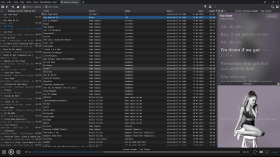
Silben-Texte für MediaMonkey
Syllable Lyrics erweitert MediaMonkey 5 und MediaMonkey 2024 um eine synchronisierte Karaoke-Funktion, die Wort für Wort hervorhebt.
Merkmale
- Wort- und Silbenhervorhebung synchronisiert mit der Wiedergabe
- Klickbare Zeitlinien zum Suchen
- Automatische, reibungslose Zentrierung der aktiven Liedzeile
- Integriertes, verbessertes LRC- und TTML-Wort-Timing
- Normales LRC-Zeilen-Timing und Klartext-Fallback
- Hintergrundgesang und abwechselnde Gesangsstimmen, sofern vom Anbieter bereitgestellt
- Lyrics+ kompatibel mit KPOE, Unison und LRCLIB Online-Suche
- Optionale Anbieter- oder Google-basierte Romanisierung
- Verschwommene Hintergründe mit dem Cover des aktuellen Albums im Normal- und Vollbildmodus
- Konfigurierbarer Zeitversatz, Online-Suche und sanftes Scrollen
Syllable Lyrics for MediaMonkey
Syllable Lyrics adds synchronized word-by-word karaoke highlighting to MediaMonkey 5 and MediaMonkey 2024.
FeaturesHide original
- Word and syllable highlighting synchronized with playback
- Clickable timed lines for seeking
- Smooth automatic centering of the active lyric line
- Embedded enhanced LRC and TTML word timing
- Ordinary LRC line timing and plain-text fallback
- Background vocals and alternating singer alignment when supplied by the provider
- Lyrics+ compatible KPOE, Unison, and LRCLIB online lookup
- Optional provider or Google-powered romanization
- Blurred current-album-art backgrounds in normal and fullscreen modes
- Configurable timing offset, online lookup, and smooth scrolling
By
GhosT
Erstellt von ghost.specialgrade
Aktualisiert 08/08/2026
Versionsverlauf/Details
- Version:
- 0.1.21
- Aktualisiert:
- 08/08/2026
- Size:
- 27.51 KB
- Lizenz:
- MIT License
- Funktioniert mit:
- Media Monkey 5.0 - 2024
- Änderungen:
Syllable Lyrics v0.1.21
This release improves synchronized lyric discovery, dual-script romanization, karaoke animation, scrolling, and fullscreen presentation for MediaMonkey 5 and MediaMonkey 2024.
What’s New
- Added synchronized dual-script lyrics that preserve both original and romanized text
- Added word-by-word karaoke wipes for both scripts when aligned syllable timing is available
- Added an option to display romanized lyrics as the primary text
- Added BiniLyrics lookup with TTML word-timing support
- Improved Lyrics+, Unison, and LRCLIB parsing and provider prioritization
- Word-timed lyrics now consistently outrank line-timed and plain-text results
- Provider-supplied transliteration is preferred, with optional Google-powered romanization as a fallback
- Added background-vocal and alternating-singer presentation
- Added manual lyric scrolling with a five-second pause before automatic centering resumes
- Improved active-line depth, glow, shadows, karaoke wipes, and character animation
- Improved normal and fullscreen album-art backgrounds
- Fixed inherited fullscreen text-shadow artifacts
- Added additional parsing, provider-priority, romanization, and timing regression tests
Romanization
The original and romanized lyrics remain visible together. You can choose which script appears as the primary text.
For word-timed lyrics with aligned transliteration, both scripts share the same timestamps and receive synchronized karaoke wipes. Line-only transliteration remains visible but cannot provide a true word-by-word wipe without aligned timing.
- Version:
- 0.1.20
- Aktualisiert:
- 19/07/2026
- Size:
- 25.15 KB
- Lizenz:
- MIT License
- Funktioniert mit:
- Media Monkey 5.0.0 - 5.0.0