Passen Sie das Erscheinungsbild von MediaMonkey an.

Bietet die Möglichkeit, bestimmte Bedienfelder in einem separaten Fenster abzudocken. Derzeit unterstützte Bedienfelder:
- Aktuelle Wiedergabe (Klicken Sie auf â und dann auf „Abdocken“)
- Text
- Wiedergabelisten (Klicken Sie mit der rechten Maustaste auf eine Wiedergabeliste im Medienbaum oder klicken Sie im Hauptfenster auf â und dann auf „Abdocken“)
Provides the ability to undock certain panels into a separate window. Currently supported panels:
Hide original
- Now Playing (Click on â and then click Undock)
- Lyrics
- Playlists (Right click on a playlist in the Media Tree, or click on â in the main panel, then click Undock)
By
Ventis Media, Inc.
Erstellt von drakinite
Aktualisiert 30/11/2024
Versionsverlauf/Details
- Version:
- 1.3
- Aktualisiert:
- 30/11/2024
- Size:
- 18.35 KB
- Funktioniert mit:
- Media Monkey 2024.0.0
- Änderungen:
Fixed Playing List not respecting "Simplified List"/"List" setting
Fixed crashes on MM2024.0.0
- Version:
- 1.2.1
- Aktualisiert:
- 25/02/2022
- Size:
- 7.89 KB
- Funktioniert mit:
- Media Monkey 5.0.0
- Änderungen:
Added "toggling" support for undock hotkeys. Hitting the undock hotkey twice will close the dialog instead of opening a second one.
- Version:
- 1.2
- Aktualisiert:
- 25/02/2022
- Size:
- 6.87 KB
- Funktioniert mit:
- Media Monkey 5.0.0
- Änderungen:
Added support for Playlists.
- Version:
- 1.1.1
- Aktualisiert:
- 24/02/2022
- Size:
- 3.24 KB
- Funktioniert mit:
- Media Monkey 5.0.0
- Änderungen:
- Added the ability to make keyboard shortcuts for undocking panels
- Fixed Lyrics undocked window not having a title
- Made the icon play more nicely with the new Lyrics Font Size sample addon
- Version:
- 1.1
- Aktualisiert:
- 24/02/2022
- Size:
- 2.75 KB
- Funktioniert mit:
- Media Monkey 5.0.0
- Änderungen:
- Added support for Lyrics
- Added support for List in Playing
- Renamed to Undock Panels
- Version:
- 1.0
- Aktualisiert:
- 10/02/2022
- Size:
- 1.75 KB
- Funktioniert mit:
- Media Monkey 5.0.0

Kleines Beispiel-Add-on, das dem Liedtextfenster Schaltflächen zur Steuerung der Schriftgröße hinzufügt.
Translated automatically (see original)Small sample addon which adds font size control buttons to the Lyrics window.
Hide original
By
Ventis Media, Inc.
Erstellt von drakinite
Aktualisiert 24/02/2022
Versionsverlauf/Details
- Version:
- 1.0
- Aktualisiert:
- 24/02/2022
- Size:
- 1.14 KB
- Funktioniert mit:
- Media Monkey 5.0.0
Ändert die Bildlaufleisten, sodass sie besser sichtbar sind, und fügt native Bildlaufschaltflächen unter Berücksichtigung der Hautfarben hinzu.
Kompatibel mit allen Skins, aber inkompatibel mit nativen Bildlaufleisten .
Translated automatically (see original)Modifies the scroll bars to be more visible, and adds native-like scroll buttons while respecting skin colors.
Compatible with all skins, but incompatible with Native Scrollbars.
Hide original
By
Ventis Media, Inc.
Erstellt von drakinite
Aktualisiert 19/03/2022
Versionsverlauf/Details
- Version:
- 1.0
- Aktualisiert:
- 19/03/2022
- Size:
- 2.28 KB
- Funktioniert mit:
- Media Monkey 5.0
Erzwingt, dass MediaMonkey die nativen Bildlaufleisten des Browsers verwendet und die von Skins ignoriert.
Kompatibel mit allen Skins, aber inkompatibel mit Modified Scrollbars .
Translated automatically (see original)Forces MediaMonkey to use the browser's native scrollbars, ignoring those from skins.
Compatible with all skins, but incompatible with Modified Scrollbars.
Hide original
By
Ventis Media, Inc.
Erstellt von drakinite
Aktualisiert 19/03/2022
Versionsverlauf/Details
- Version:
- 1.0
- Aktualisiert:
- 19/03/2022
- Size:
- 1.74 KB
- Funktioniert mit:
- Media Monkey 5.0
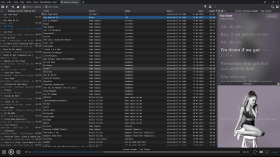
Silben-Texte für MediaMonkey
Syllable Lyrics erweitert MediaMonkey 5 und MediaMonkey 2024 um eine synchronisierte Karaoke-Funktion, die Wort für Wort hervorhebt.
Merkmale
- Wort- und Silbenhervorhebung synchronisiert mit der Wiedergabe
- Klickbare Zeitlinien zum Suchen
- Automatische, reibungslose Zentrierung der aktiven Liedzeile
- Integriertes, verbessertes LRC- und TTML-Wort-Timing
- Normales LRC-Zeilen-Timing und Klartext-Fallback
- Hintergrundgesang und abwechselnde Gesangsstimmen, sofern vom Anbieter bereitgestellt
- Lyrics+ kompatibel mit KPOE, Unison und LRCLIB Online-Suche
- Optionale Anbieter- oder Google-basierte Romanisierung
- Verschwommene Hintergründe mit dem Cover des aktuellen Albums im Normal- und Vollbildmodus
- Konfigurierbarer Zeitversatz, Online-Suche und sanftes Scrollen
Syllable Lyrics for MediaMonkey
Syllable Lyrics adds synchronized word-by-word karaoke highlighting to MediaMonkey 5 and MediaMonkey 2024.
FeaturesHide original
- Word and syllable highlighting synchronized with playback
- Clickable timed lines for seeking
- Smooth automatic centering of the active lyric line
- Embedded enhanced LRC and TTML word timing
- Ordinary LRC line timing and plain-text fallback
- Background vocals and alternating singer alignment when supplied by the provider
- Lyrics+ compatible KPOE, Unison, and LRCLIB online lookup
- Optional provider or Google-powered romanization
- Blurred current-album-art backgrounds in normal and fullscreen modes
- Configurable timing offset, online lookup, and smooth scrolling
By
GhosT
Erstellt von ghost.specialgrade
Aktualisiert 12/10/2026
Versionsverlauf/Details
- Version:
- 0.1.22
- Aktualisiert:
- 12/10/2026
- Size:
- 37.24 KB
- Lizenz:
- MIT License
- Funktioniert mit:
- Media Monkey 5.0 - 2024
- Änderungen:
Added new lyrics providers
- Version:
- 0.1.21
- Aktualisiert:
- 08/08/2026
- Size:
- 27.51 KB
- Lizenz:
- MIT License
- Funktioniert mit:
- Media Monkey 5.0 - 2024
- Änderungen:
Syllable Lyrics v0.1.21
This release improves synchronized lyric discovery, dual-script romanization, karaoke animation, scrolling, and fullscreen presentation for MediaMonkey 5 and MediaMonkey 2024.
What’s New
- Added synchronized dual-script lyrics that preserve both original and romanized text
- Added word-by-word karaoke wipes for both scripts when aligned syllable timing is available
- Added an option to display romanized lyrics as the primary text
- Added BiniLyrics lookup with TTML word-timing support
- Improved Lyrics+, Unison, and LRCLIB parsing and provider prioritization
- Word-timed lyrics now consistently outrank line-timed and plain-text results
- Provider-supplied transliteration is preferred, with optional Google-powered romanization as a fallback
- Added background-vocal and alternating-singer presentation
- Added manual lyric scrolling with a five-second pause before automatic centering resumes
- Improved active-line depth, glow, shadows, karaoke wipes, and character animation
- Improved normal and fullscreen album-art backgrounds
- Fixed inherited fullscreen text-shadow artifacts
- Added additional parsing, provider-priority, romanization, and timing regression tests
Romanization
The original and romanized lyrics remain visible together. You can choose which script appears as the primary text.
For word-timed lyrics with aligned transliteration, both scripts share the same timestamps and receive synchronized karaoke wipes. Line-only transliteration remains visible but cannot provide a true word-by-word wipe without aligned timing.
- Version:
- 0.1.20
- Aktualisiert:
- 19/07/2026
- Size:
- 25.15 KB
- Lizenz:
- MIT License
- Funktioniert mit:
- Media Monkey 5.0.0 - 5.0.0

Dieses Add-on schaltet die Schaltflächen zum Schließen von Registerkarten wieder so um, dass sie nur angezeigt werden, wenn sich die Maus darüber befindet.
Translated automatically (see original)This addon switches the tab close buttons back to only show when the mouse is hovering over them.
Hide original
By
Ventis Media, Inc.
Erstellt von drakinite
Aktualisiert 08/12/2020
Versionsverlauf/Details
- Version:
- 1.0
- Aktualisiert:
- 08/12/2020
- Size:
- 680 B
- Funktioniert mit:
- Media Monkey 5.0.0 - 5.0.0